Summer Beach 3D Shadow Box: Integrating Layered Paper Art into Creative Workflows
In the realm of digital crafting and physical product creation, the transition from a digital file to a tangible object requires precision, planning, and an understanding of material constraints. The Summer Beach 3D Shadow Box represents a specific intersection of these disciplines. It is not merely a decorative item; it is a structured design template that demands a systematic approach to execution. For professionals, hobbyists, and small business owners alike, integrating this layered paper-cutting template into a workflow involves more than just printing and gluing. It requires an understanding of file formats, cutting mechanics, spatial assembly, and final presentation strategies.
This article breaks down the practical implementation of the Summer Vibes 3D Layered Paper Cut, focusing on how to efficiently manage the assets, prepare for production, and execute the assembly with high-quality results. Whether you are creating a unique gift, adding a product to your Etsy shop, or simply engaging in a focused creative session, treating this project as a structured process ensures consistency and minimizes waste.
Asset Management and File Compatibility
The foundation of any successful digital-to-physical project lies in the integrity and versatility of the source files. The Summer Beach 3D Shadow Box template is provided in multiple formats, each serving a distinct purpose within the production pipeline. Understanding which file to use at which stage is critical for maintaining quality and efficiency.
- AI (Adobe Illustrator) & EPS: These vector formats are essential for professional editing. If you need to adjust line weights, modify text elements, or scale the design without losing resolution, these files are your primary tools. They ensure that the cut lines remain crisp regardless of the output size.
- SVG (Scalable Vector Graphics): This is the most critical format for automation. The SVG file included is specifically optimized for cutting machines such as Silhouette and Cricut. It contains the precise path data required for the machine’s blade to follow. When importing this into your cutting software, verify that the layer order matches the intended depth of the shadow box.
- PNG & JPEG: While useful for previewing the final aesthetic or sharing concept art, raster images like PNG (714 x 714 px) and JPEG (3000 x 2000 px) are generally unsuitable for direct cutting due to pixelation. Use these only for reference or marketing materials before committing to physical production.
Before beginning the physical build, organize these files in a dedicated folder structure. Label them clearly by layer number or color to streamline the sorting process later. This organizational step reduces cognitive load during assembly and prevents errors where one might confuse the background layers with foreground elements.
Preparation and Material Selection
Once the digital assets are prepared, the next phase involves selecting appropriate materials. The template specifies a finished size of 20.32 × 20.32 cm (8 inches), which dictates the dimensions of your paper stock. For a clean, professional look, standard cardstock is recommended, but heavier weights provide better structural integrity for the stacking effect.
Consider the following factors when sourcing materials:
- Paper Weight: Lighter papers may buckle under their own weight when stacked. A weight between 180gsm and 250gsm offers a good balance between ease of cutting and rigidity.
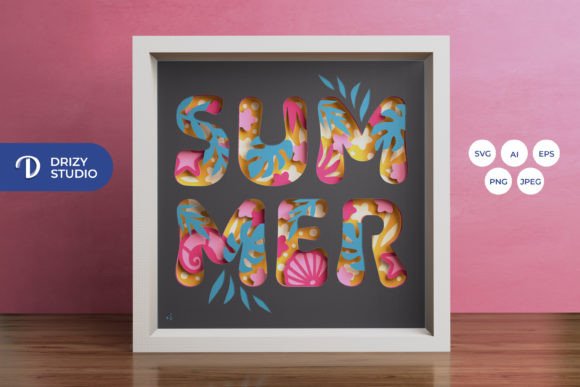
- Color Consistency: The preview images show a vibrant summer palette. However, monitor calibration and printer settings can alter perceived colors. Always print a test strip on your chosen paper stock to verify hue accuracy before committing to the full set of layers.
- Tool Compatibility: While the SVG file supports automated cutting, manual execution using an art knife and scissors is entirely viable. If working manually, ensure your cutting mat is fresh and your blades are sharp. Dull blades tear paper fibers, resulting in jagged edges that disrupt the smooth gradient effect created by the shadows.
Efficiency in preparation also extends to workspace setup. Clear a large, flat surface that accommodates the largest sheet of paper. Keep your adhesive, spacers, and cutting tools within immediate reach to maintain flow during the assembly phase.
Execution: Cutting and Layering Strategy
The core functionality of the Summer Beach 3D Shadow Box relies on the interaction between six distinct layers. Each layer contributes to the overall depth and visual narrative of the beach scene. The execution phase requires patience and attention to detail.
If using a cutting machine, run the SVG file through your software and double-check the cut settings for your specific paper type. Start with the back layers first, as they often contain larger, simpler shapes that anchor the composition. As you progress to the front layers, handle the pieces with care to avoid fingerprints or creases.
For those cutting manually, trace the designs onto the reverse side of the paper to preserve the integrity of the printed side if necessary. Cut slowly along the lines, rotating the paper rather than the knife for better control. Remember that minor deviations in cutting can accumulate, affecting how well the layers align during assembly.
After cutting, sort the pieces immediately by layer number. Grouping them prevents confusion later. At this stage, you might also consider testing the fit by placing the layers together without glue. This "dry fit" allows you to identify any overlapping issues or misalignments before permanent adhesion occurs.
Assembly and Structural Integrity
Assembly is where the two-dimensional design transforms into a three-dimensional object. The success of this transformation depends heavily on the spacing between layers. To achieve the signature "shadow box" effect, consistent gaps are required between each of the six layers.
You can achieve this spacing using several methods:
- Double-sided foam tape: This is the preferred method for many crafters as it provides uniform thickness and strong adhesion.
- Small spacers: Tiny squares of scrap paper or specialized acrylic spacers can be glued between layers to create precise gaps.
- Glue dots: These offer a quick solution but may vary slightly in height, leading to uneven shadows.
Begin assembly from the back layer forward. Apply your chosen spacer method to the corners and center of each piece, then stack them sequentially. Ensure that the alignment marks or natural edges of the design line up perfectly. Misalignment at the base will compound as you add layers, resulting in a skewed final image.
For added stability, especially if the shadow box will be transported or displayed in high-traffic areas, reinforce the corners with additional adhesive. The goal is a rigid structure that does not flex or warp over time.
Integration into Broader Projects and Gifting
The Summer Beach 3D Shadow Box is versatile enough to serve various roles in your personal or professional life. Its application extends beyond simple decoration.
Home Office and Workspace Design: In a remote work environment, visual stimuli play a significant role in mood and productivity. Placing this shadow box on a desk or shelf introduces a calming, coastal element that contrasts with digital screens. It serves as a focal point for brief mental resets during busy workflows.
Gift Economy and Small Business: For entrepreneurs and makers, this template offers a low-barrier entry into selling handmade goods. Because the design is digital, the overhead costs are minimal—limited primarily to paper and labor. You can brand your packaging with custom tags, turning a simple craft into a premium product. The square format (20.32 cm) fits standard off-the-shelf framing options, making it accessible for customers who prefer ready-made frames.
Educational and Collaborative Projects: Educators and team leaders can use the assembly process as a metaphor for project management. Breaking down the complex whole into manageable layers teaches stakeholders about dependency, sequencing, and the importance of individual contributions to a unified outcome. It is a tangible exercise in systems thinking.
Advanced Enhancements: Lighting and Framing
To elevate the Summer Beach 3D Shadow Box from a craft project to a professional installation, consider integrating lighting. Adding LED strip lights behind the layers creates a glowing effect that enhances the vibrancy of the summer theme. This technique adds value and complexity, appealing to clients or users looking for ambient decor solutions.
When implementing LEDs, ensure that the light source is diffused to prevent hotspots. Battery-operated strips are ideal for portability, while plug-in options allow for longer display times. Test the lighting setup before finalizing the frame to ensure the brightness complements, rather than overwhelms, the paper details.
Framing choices also impact the final perception. A deep-frame shadow box frame is necessary to accommodate the layer depth. Alternatively, mounting the assembled box directly onto a wall using floating brackets can create a modern, minimalist aesthetic. Regardless of the method, protect the artwork from dust and humidity to ensure long-term preservation.
Conclusion on Implementation
Successfully executing the Summer Beach 3D Shadow Box project hinges on respecting the process. From managing diverse file formats like AI, EPS, and SVG to selecting compatible materials and executing precise cuts, each step builds upon the last. By approaching this creative endeavor with the same rigor applied to other professional tasks, you ensure a high-quality outcome that stands the test of time.
The flexibility of the template allows for customization, whether through color variations, lighting enhancements, or integration into broader gifting strategies. Ultimately, the value of this asset lies not just in its aesthetic appeal, but in the satisfaction derived from transforming a digital blueprint into a tactile, layered reality. With careful preparation and mindful execution, the Summer Vibes 3D Layered Paper Cut becomes more than a decoration—it becomes a testament to thoughtful craftsmanship.